The Input Steps Popup Editor, accessible by clicking the drop-down control in any window where Inputs appear, allows you to specify the number of steps that will be taken across an input’s min-max range during an analysis.
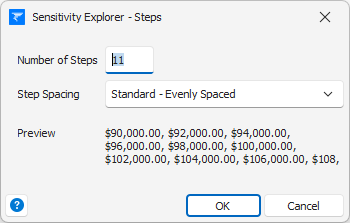
Number of Steps – the number of steps that will be taken during an analysis.
Step Spacing – in general the analysis steps will be Evenly Spaced across the min-max range of the input. However, sometimes it is more appropriate to use Rounded spacing to always force the input value to be an integer if your model requires that.
Preview - based on the settings you've chosen in the dialog and the minimum and maximum input values specified elsewhere, you will see a (possibly truncated) table of the values that will actually be used in analyses.
Note: Depending on the settings you choose and which type of analysis you are performing, Sensitivity Explorer will sometimes perform add an extra step to ensure the base-value itself is always included in the calculations. This is because certain analyses actually require the base-value to be explicitly present in the data set while others do not.
See the article Inputs and Outputs Overview for more general information about inputs and outputs.
Was this article helpful?
That’s Great!
Thank you for your feedback
Sorry! We couldn't be helpful
Thank you for your feedback
Feedback sent
We appreciate your effort and will try to fix the article