Polished Analytics uses FastSpring, our authorized software reseller. To manage a subscription you’ve purchased, you can go to the FastSpring account management portal using the same email you used to purchase your license.
If you still have access to the email confirmation of your purchase, you can click the “Manage your Orders” link in that email. If not, you can go to https://polishedanalytics.onfastspring.com/account
In either case, you will need to confirm your email. After doing so, FastSpring will send an email with a link to access the portal.
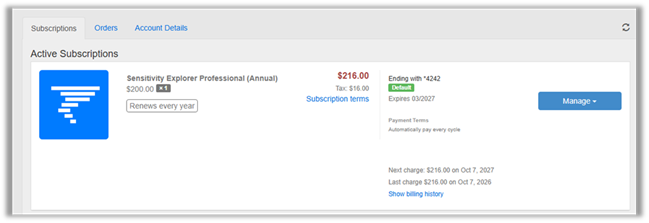
From within this portal, you can:
- Find your license key if you have misplaced it.
- Update your payment method.
- Cancel your subscription.
There are a few things that will require additional help from Polished Analytics technical support to accomplish:
- Changing the email address associated with a subscription.
- Changing from a monthly subscription to a yearly subscription.
- Changing which edition (basic, professional, enterprise) of a subscription.
We’d be happy to help you accomplish these tasks. Make an account on our support portal and submit your request https://polishedanalytics.freshdesk.com/support/login
Was this article helpful?
That’s Great!
Thank you for your feedback
Sorry! We couldn't be helpful
Thank you for your feedback
Feedback sent
We appreciate your effort and will try to fix the article